Emergency exit signs are critical safety devices in buildings, guiding occupants to safety during fires, power outages, or other emergencies. These signs operate continuously, often relying on backup batteries to remain illuminated when the main power fails. Over time, these batteries degrade and require replacement to ensure the signs function reliably. Learning how to change the battery in an emergency exit sign is a straightforward but essential skill for facility managers, building owners, or anyone responsible for maintaining safety equipment. This article provides a step-by-step guide, safety precautions, and key considerations to help you complete this task efficiently and correctly.
Part 1: How to Change the Battery in an Emergency Exit Sign
Before replacing the battery, gather the necessary tools and materials. Most emergency exit signs use rechargeable batteries, such as nickel-cadmium (NiCd) or sealed lead-acid (SLA) types, though some may use lithium-ion variants. Check the manufacturer’s specifications to confirm the correct battery model. You’ll also need a screwdriver (usually Phillips or flathead), a non-conductive work surface, and safety gloves to protect against electrical components.
Step 1: Turn Off Power to the Emergency Exit Sign
Safety is paramount. Locate the circuit breaker or switch controlling the sign’s power supply and turn it off. This prevents electrical shock while handling the unit. If the sign is hardwired, use a voltage tester to confirm no current is flowing before proceeding.
Step 2: Access the Battery Compartment
Most emergency exit signs have a removable cover or panel secured by screws. Use the appropriate screwdriver to loosen these screws and gently pry open the compartment. Some models may have a latch or clip system—refer to the user manual if unsure.
Step 3: Remove the Old Battery
Carefully disconnect the battery terminals, starting with the negative (black) wire followed by the positive (red) wire. Avoid using metal tools to pry the battery out, as this could damage the connectors or create sparks. If the battery is secured with clips or brackets, release them before lifting the battery out.
Step 4: Install the New Battery
Place the new battery into the compartment, ensuring it aligns with the designated orientation (usually marked with “+” and “-” symbols). Reconnect the terminals, attaching the positive wire first, then the negative. Ensure the connections are secure but avoid overtightening, which could strip the threads.
Step 5: Close the Compartment and Restore Power
Reattach the cover or panel and tighten the screws. Turn the power back on at the circuit breaker. Test the emergency exit sign by simulating a power failure (if equipped with a test button) or by manually disconnecting the main power. The sign should switch to battery mode and remain illuminated for at least 90 minutes, as required by safety standards.
Step 6: Dispose of the Old Battery Properly
Emergency exit sign batteries contain hazardous materials and must be recycled according to local regulations. Contact a certified recycling center or battery disposal service to avoid environmental harm.
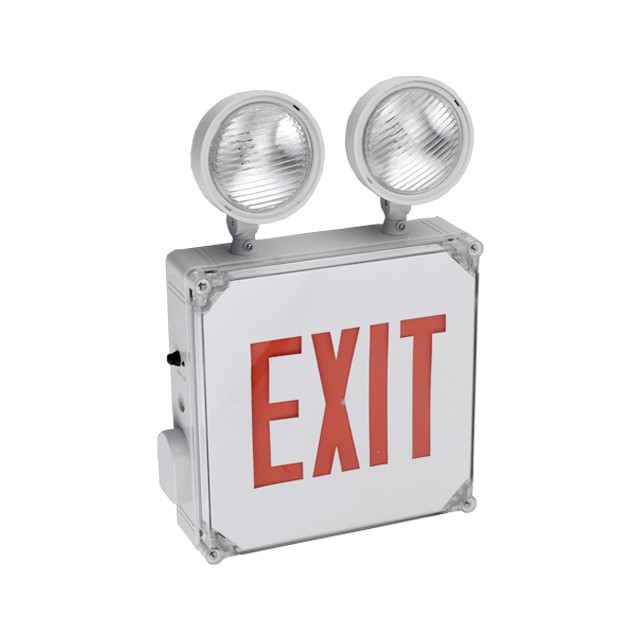
Part 2: Key Considerations When Changing the Battery
Battery Compatibility
Always use the battery type specified by the manufacturer. Using an incompatible battery can damage the emergency exit sign or reduce its runtime during an emergency. For example, substituting a lithium-ion battery for a NiCd model may overheat the unit or trigger safety shutdowns.
Testing the Sign After Replacement
After installing the new battery, perform a full functional test. This includes verifying that the sign illuminates instantly during a power outage and maintains brightness for the required duration. Some jurisdictions mandate monthly or annual tests—document these procedures to comply with fire codes.
Scheduling Regular Maintenance
Batteries typically last 3–5 years, but factors like temperature fluctuations and frequent power cycling can shorten their lifespan. Create a maintenance schedule to inspect and replace batteries proactively. Combine this with checks for physical damage, such as cracked casings or faded bulbs.
Understanding Local Regulations
Emergency exit sign requirements vary by region. For instance, the National Fire Protection Association (NFPA) in the U.S. sets standards for illumination levels and battery backup times. Familiarize yourself with these rules to avoid fines or safety violations.
Part 3: Common Mistakes to Avoid
Ignoring Safety Protocols: Failing to disconnect power before servicing the sign can lead to electrocution. Always double-check that the unit is de-energized.
Forcing Components: Using excessive force to open the battery compartment or remove wires may break delicate parts. Work gently and consult the manual if resistance occurs.
Overlooking Warranty Terms: Some manufacturers void warranties if unauthorized repairs are made. Contact the supplier for guidance if the sign is under warranty.
Neglecting Documentation: Keep records of battery replacements and tests. This proves compliance during inspections and helps track the unit’s history.
Conclusion
Changing the battery in an emergency exit sign is a simple yet vital task that ensures these life-saving devices operate effectively during crises. By following the steps outlined above—prioritizing safety, using compatible batteries, and adhering to testing protocols—you can maintain compliance with safety standards and protect occupants. Regular maintenance not only extends the lifespan of the emergency exit sign but also provides peace of mind knowing that evacuation routes will remain visible when needed most. Whether you’re a property manager or a DIY enthusiast, mastering this skill demonstrates a commitment to safety and preparedness. Always stay informed about evolving regulations and technological advancements in emergency lighting to keep your building secure.

Phone: 0086-13566557272
Whatsapp: +86-13566557272
ADD: No.546 Qiye Road, Zhouxiang Town, Cixi, Zhejiang, China
ADD: Within Dinh Vu - Cat Hai Economic Zone, Dong Hai 2 Ward, Hai An District, Hai Phong City, Viet Nam
Customer Message


 Dual Head Emergency Light
 LED Emergency Light Remote Head
 Twin Spot Emergency Light
 Rechargeable LED Emergency Light
 Emergency Downlight
 Fire Exit Sign
 Running Man Exit Sign
 SALIDA Exit Signs
 SAÍDA Exit Signs
 Recessed Exit Sign
 UL Listed Exit Light
 Customized EXIT SIGN
 Power & Lighting Exit Sign
 Mounting & Housing Exit Sign
 Self Test Exit Sign
  Directional exit sign
 Custom Legends exit sign
 Custom Acrylic Signs
 LED Emergency Inverter
 Emergency Ballast
 Emergency Battery